CSV to XML Converter
XML is a great exchange format supported by literally thousands of data management software and services. Now, what if you only have a bunch of CSV files? Surely, the data are there, just take them. But in the real world this means you have to manually export data from CSV to XML file by file. That’s just ridiculous! There has to be some other way!
And you know what? There is a simple and inexpensive utility to convert all of your CSV to XML files without hassle and troublesome manual operation. The tool is called Advanced CSV Converter. With it, you can run conversion from GUI or use command line execution and save hours! Indeed, you surely have other work to do than manual conversion, do you?
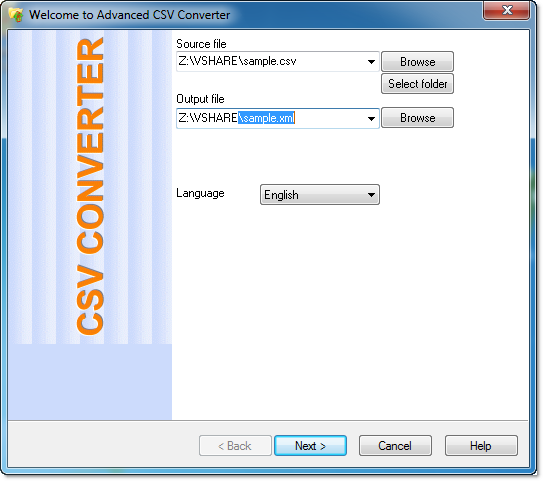
1. Select the csv file (or select folder with csv files for batch conversion).
2. Select the output XML file (or select folder for XML files).
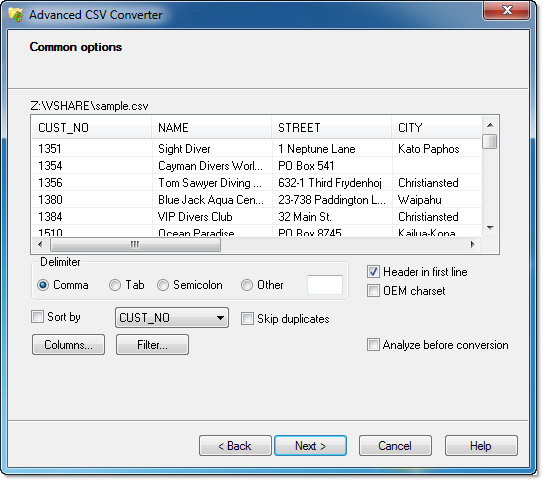
3. Preview and adjust conversion.
CSV to XML conversion via Command Line
"c:\Program Files\CSV Converter\csvcnv.exe" file.csv outfile.xml [/FILTER | /COLUMNS | /SORTBY | /SRCSEP | /STARTFROM | /WFILTER | /RootTag | /RecordTag]
Simple CSV to XML conversion
"c:\Program Files\CSV Converter\csvcnv.exe" sample.csv sample.xml
Convert CSV to XML with columns selection
"c:\Program Files\CSV Converter\csvcnv.exe" sample.csv sample.xml /COLUMNS:NAME,STREET
Convert csv to xml with filter
"c:\Program Files\CSV Converter\csvcnv.exe" sample.csv out.xml /FILTER:myfilter.txt
Convert CSV to XML with sorting order
"c:\Program Files\CSV Converter\csvcnv.exe" sample.csv sample.xml /sortby:SUM
Convert CSV to XML with TAB as delimiter in source file
"c:\Program Files\CSV Converter\csvcnv.exe" sample.csv sample.xml /SRCSEPTAB
Convert CSV to XML with PIPE as delimiter in source file
"c:\Program Files\CSV Converter\csvcnv.exe" sample.csv sample.xml /SRCSEPPIPE
Convert CSV to XML from line 3
"c:\Program Files\CSV Converter\csvcnv.exe" sample.csv sample.xml /STARTFROM:3
CSV to XML batch conversion
"c:\Program Files\CSV Converter\csvcnv.exe" c:\base\*.csv c:\out /TOXML
Using Wide filter
"c:\Program Files\CSV Converter\csvcnv.exe" sample.csv out.xml /wfilter:NY
Using customization
"c:\Program Files\CSV Converter\csvcnv.exe" sample.csv out.xml /roottag:myroot /recordtag:myrec