Convert DBF to XLS
DBF Converter allows you convert a single dbf file or folder with dbf files to xls (excel) format from GUI or command line.
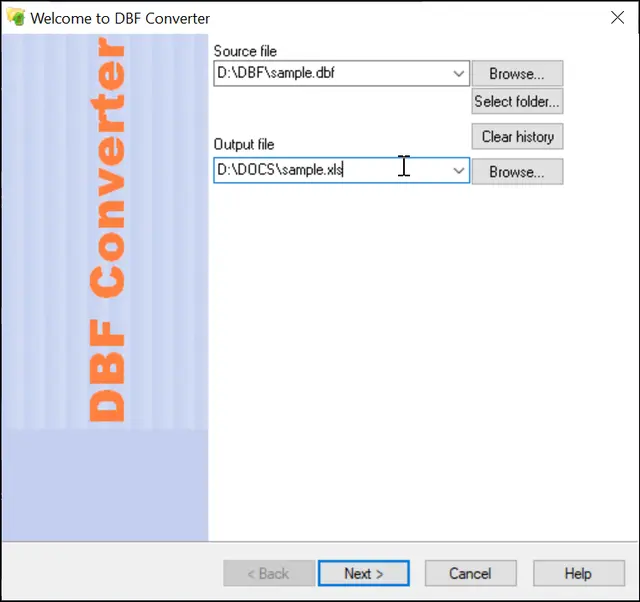
1. Select the dbf file or folder with dbf files for batch conversion.
2. Select the output XLS (excel) file or folder for .xls files.
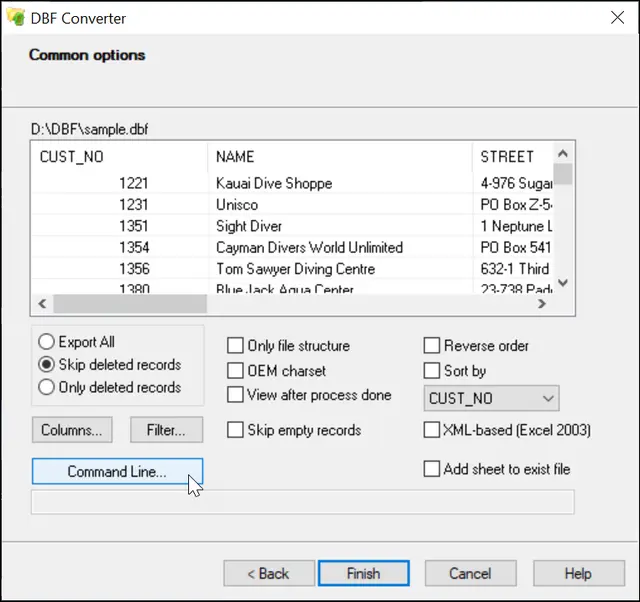
3. Preview, select options for sorting, filtering data (if necessary)
You can also select/unselect columns, set order for columns, and click "Finish".
DBF to XLS Command Line
"c:\Program Files (x86)\DBF Converter\dbfcnv.exe" file.dbf file.xls [/HDR | /FILTER | /COLUMNS | /COLUMNSLIST | /REVERSE | /SORTBY | /ADDTOEXIST ]
Simple DBF to XLS conversion
"c:\Program Files (x86)\DBF Converter\dbfcnv.exe" sample.dbf sample.xls /COLUMNS:NAME,STREET
DBF to XLS conversion with selected columns
"c:\Program Files (x86)\DBF Converter\dbfcnv.exe" sample.dbf sample.xls /COLUMNS:NAME,STREET
Convert folder with DBF files to XLS format
"c:\Program Files (x86)\DBF Converter\dbfcnv.exe" d:\base\*.dbf d:\out\ /TOXLS
Add sheet to existing XLSX file
"c:\Program Files (x86)\DBF Converter\dbfcnv.exe" sample.dbf mytable.xlsx /addtoexist
Convert DBF to XLS with sorting
"c:\Program Files (x86)\DBF Converter\dbfcnv.exe" sample.dbf mytable.xls /SORTBY:Name [/ignorecase]
Convert multiple DBF files to one Excel file
"c:\Program Files (x86)\DBF Converter\dbfcnv.exe" c:\base\*.dbf table.xlsx