Modify DBF File Structure
Modifying DBF structure means one of the following:
- Adding new fields to the dbf database
- Deleting existing fields
- Changing order of fields
- Renaming fields
- Changing the type or size of fields
All of these operations can be done in the program. Here is how.
First of all, select the File | Modify menu. This will open the Modify file structure dialog box:
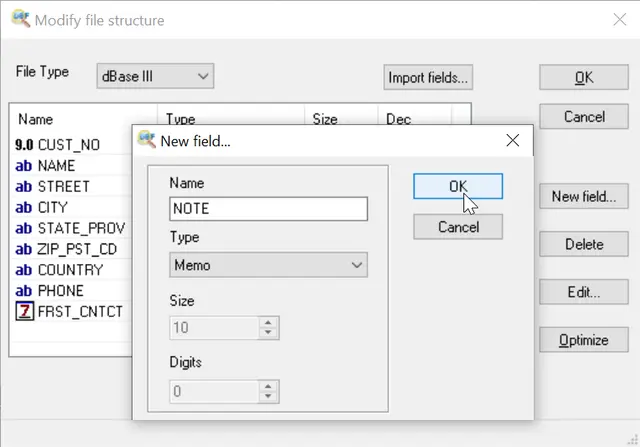
In this dialog you can see all fields of the database as a list displaying name, type, size of each fields as well as their order. Note that you cannot change the contents of these fields here. You need to edit the DBF file instead to do this. This dialog box only changes the structure of the DBF file.
To edit a new field, click the New field button and fill in the name, the type and the size of the new field. Similarly, to edit the selected field, click the Edit button.
To delete a field, select it in the list, then click the Delete button. You will need to confirm this action.
To change the order of fields, select a field and move it up or down using the arrow button just to the right of the list.
To adding fields from other dbf file, click the Import fields button.
Finally, the Optimize button allows you to set each field length to its minimum possible value, determined by the maximum length of this field contents. For example, if among all records the longest value in the “Last name” field is “Schwarzenegger”, this field will be cut to 14 characters length.
Rename fields via Command Line
"c:\Program Files (x86)\DBF Viewer 2000\dbview.exe" mybase.dbf /rename:OldField:NewField
DOWNLOAD
for FREE
Updated Fri, 22 Mar 2024
See also: DBF File optimization, DBF to Excel, DBF to SQL, DBF to CSV, Filtering
records, Sorting records
in dbf file, Command line
options
Back to DBF Viewer 2000 Home
Page top | Contacts | Copyright © HiBase Group, 2002-2024
|


