Sorting DBF File
You may sort the records in dbf file of any field in ascending or descending order.
- To set the ascending sorting order, i.e. A to Z, the smallest to the largest, oldest to youngest, - right-click and select Ascending command.
- To set the reverse sorting order, right-click and select Descending.
To perform more sophisticated sorting, click Tools | Advanced Sorting (Ctrl-F6) menu, or click the corresponding icon on the toolbar. Advanced Sorting dialog box opens.
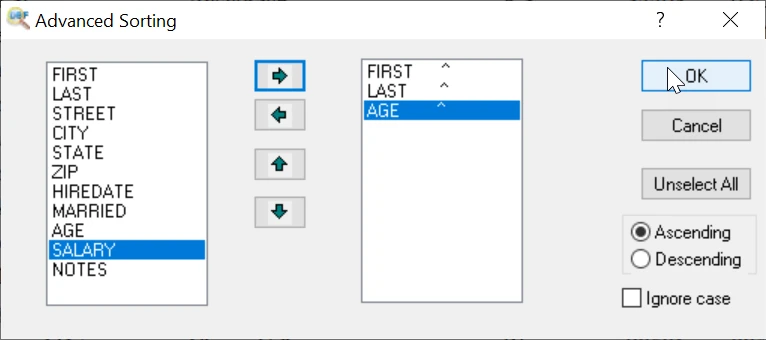
Using right and left arrows, compose the list of fields for prioritized sorting and select Ascending or Descending radio button. To clear the list, click Unselect All.
To set case-insensitive mode, i.e A=a, select "Ignore case" option.
To export records with sort order, select menu item File | Export dbf files (export dbf files to other formats)
To save sort order in this file, select menu item File | Save order
Sort records via Command Line
"c:\Program Files (x86)\DBF Viewer 2000\dbview.exe" unsorted.dbf /export:sort.dbf /SORTBY:FieldName [/DESC] [/ignorecase]
Sorting by Descending
"c:\Program Files (x86)\DBF Viewer 2000\dbview.exe" unsorted.dbf /export:sort-date.dbf /SORTBY:Date /DESC
Sorting with Ignore Case
"c:\Program Files (x86)\DBF Viewer 2000\dbview.exe" unsorted.dbf /export:sort-name.dbf /SORTBY:Name /ignorecase
See also: Export DBF to XLS, Export DBF to CSV, Export DBF to XML, Export DBF to SQL
Back to DBF Viewer 2000 Home