Menu Tools
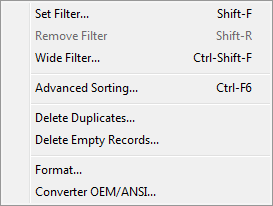
Set Filter command
Hotkey: Shift-F
Displays Filter dialog (Query by example) for filter records.
After filter done you see only records for that's filter expressions is true.
See also: Filtering records in dbf file
Remove Filter
Hotkey: Shift-R
View records as ordered in file
Delete Duplicates
Mark duplicates records as deleted, for remove this records you can use Pack command
Delete Empty records
Mark empty records as deleted, for remove this records you can use Pack command
Converter command
Convert records to ANSI or OEM code page.
Format command
Convert character fields: to Upper case, to Lower case or Capitalize
Advanced Sorting command
Ctrl-F6
Sorts the database singly or by several fields
Ascending
Sorts forwards, i.e. A to Z, the smallest to the largest, oldest to youngest.
Descending
Sorts backwards, i.e. Z to A, the largest to the smallest, youngest to oldest.
Back to DBF Viewer 2000 Home