Delete Empty Records
DBF files are still actively used in many legacy systems, business applications, and data storage solutions. Over time, these files may contain empty records that appear as a result of incorrect data imports, interrupted operations, or unfinished edits.
Although such records do not store useful information, they negatively affect database performance and data quality. Deleting empty records is an essential maintenance task, and DBF Viewer 2000 offers a reliable way to handle it.
What Are Empty Records in DBF Files?
An empty record is a database row that does not contain meaningful values in its fields. Text fields may be blank, numeric fields may be zero by default, and date fields may remain undefined. These records often remain unnoticed but can interfere with data processing, filtering, and reporting.
Step-by-step guide to Delete Empty records
Step 1: Open the DBF file
Launch DBF Viewer 2000 and open the DBF file you want to clean. After loading the file, all records and fields will be displayed in a table format, allowing you to review the data structure.

Step 2: Choose the Delete Empty Records tool
From the program menu, select the option designed to delete empty records. This tool is intended specifically for finding database rows that do not contain meaningful data and helps automate the cleanup process.
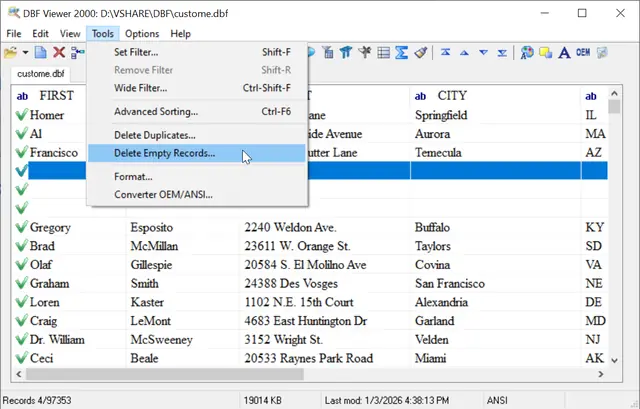
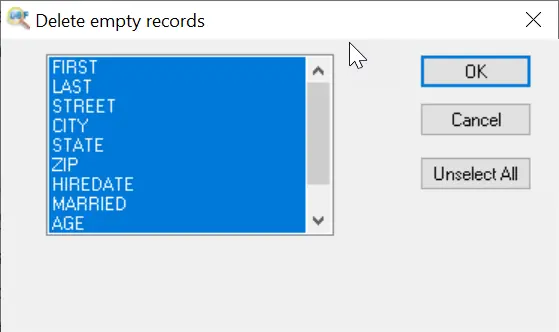
Step 3: Select fields of the database to search empty fields
At this step, choose the DBF database fields that should be checked for empty values. These are usually required or key fields, such as names, IDs, dates, or other columns that must contain data. When selecting specific fields, define what the program should treat as an empty record and avoid removing records that contain valid information in other columns.
Delete Empty Records via Command Line
"c:\Program Files (x86)\DBF Viewer 2000\dbview.exe" file.dbf /DELEMPTYS
Delete emptys in multiple files
"c:\Program Files (x86)\DBF Viewer 2000\dbview.exe" d:\mybase\*.dbf /DELEMPTYS
Frequently Asked Questions for empty records
Can deleting empty records damage my DBF file?
No, DBF Viewer 2000 removes only the selected records and keeps the database structure intact. However, creating a backup before deletion is always recommended.
How often should empty records be removed?
Regular cleanup is recommended, especially after data imports, migrations, or bulk edits. This helps maintain performance and data accuracy.
Does deleting empty records improve performance?
Yes, removing unnecessary records reduces file size, speeds up searches, and improves compatibility with other software that uses DBF files.
See also: DBF to Excel, command line options, Filtering records in dbf file
Back to DBF Viewer 2000 Home