Format Fields (2026 Update)
The Format Tool works primarily with text fields, applying consistent capitalization and removing unnecessary spaces to improve readability and uniformity.
Step-by-Step Formatting with the Format Tool
Step 1: Open the DBF file
Select the DBF file to work with. The file will appear in a spreadsheet-like table where columns correspond to fields and rows represent records.
Step 2: Choose the Format Tool
From the program menu "Tools", select the command "Format". This tool is intended specifically for finding database rows that do not contain meaningful data and helps automate the cleanup process.
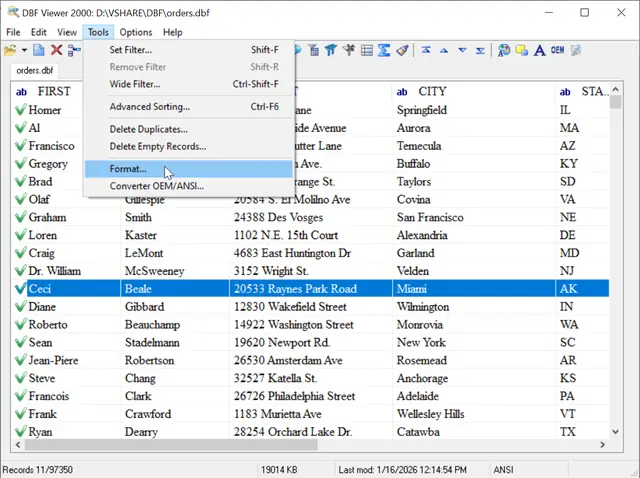
Step 3: Select Fields(s)
Choose one or more fields that you want to format. This can be a single column or multiple columns at once. For example, select the "Customer Name" field if you want to standardize all names in the table.
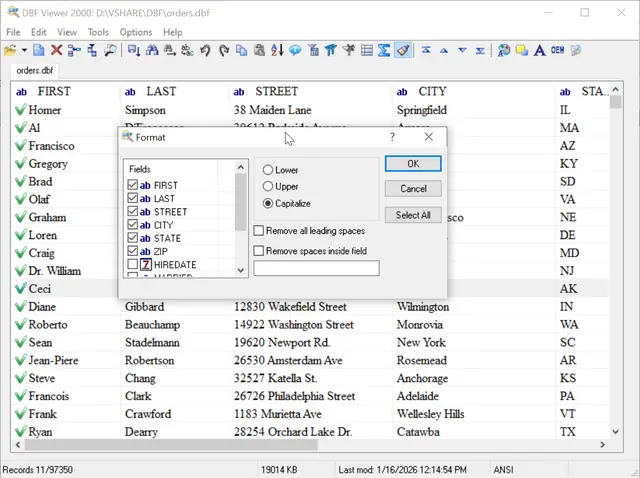
Step 4: Choose Capitalization Options
The Format Tool provides three main options for adjusting text case:
- Lower - converts all letters to lowercase.
- Upper - converts all letters to uppercase.
- Capitalize - capitalizes the first letter of each word and converts the remaining letters to lowercase.
Step 5: Adjust Spaces
Optional checkboxes allow you to:
- Remove leading spaces at the start of a field.
- Remove extra spaces inside the text.
After selecting the desired options, click OK. The formatting is immediately applied to the selected fields.
Conclusion
The Format Tool in DBF Viewer 2000 is essential for managing DBF files efficiently. When standardizing capitalization, correcting spacing, and applying batch formatting, users can maintain clean, readable, and consistent datasets.
This tool is especially valuable for accounting, business reporting, and data archiving, where consistent text formatting is crucial. With its intuitive interface, even beginners can apply formatting across large tables quickly, ensuring professional and organized data without advanced database skills.
See also: DBF to Excel, command line options, Filtering records in dbf file, Visual FoxPro End of Life: Migration Steps, ArcGIS DBF Files: Import and Export Steps
Back to DBF Viewer 2000 Home