Filling records
In DBF Viewer 2000, open the desired DBF file. Then, select Edit | Fill menu or use CTRL-L shortcut. This will bring up the following dialog:
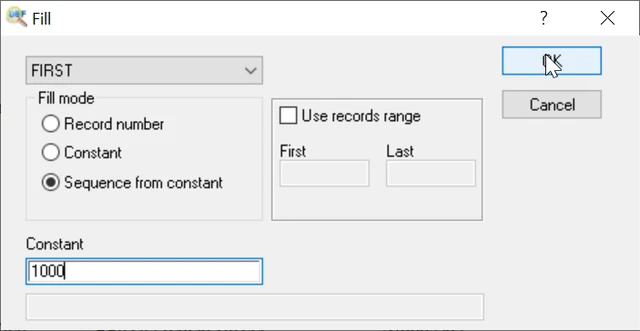
Select the field you want to work with. Then choose the fill mode: Record number, Constant, Sequence from constant. Here is what they mean:
- Record number – select this if you want to fill in the corresponding record number as the value of each record.
- Constant – records of the field are set to this constant value.
- Sequence from constant – this option works as the consequential counter starting from the specified constant value. The constant value is put into the first record of the range. Then the value is increased and put to the next record and so on. Specify the starting value in the box below.
By default DBF Viewer 2000 processes all of the records in the DBF file. If necessary, you can limit the range of records using the "Use records range" option. Enable the option and specify the first and last numbers of records. DBF Viewer 2000 will process only the specified record interval.
Filling records via Command Line
Filling records with constant
"c:\Program Files (x86)\DBF Viewer 2000\dbview.exe" mydatabase.dbf /FILL:SUM:100
Filling records by filter
"c:\Program Files (x86)\DBF Viewer 2000\dbview.exe" mydatabase.dbf /FILTER:myfilter.txt /FILL:SUM:100
Filling with current date
"c:\Program Files (x86)\DBF Viewer 2000\dbview.exe" mydatabase.dbf /FILL:MYDATE:today()