DBF File Statistics
This function of DBF Viewer 2000 provides useful statistics of the opened DBF file. Specifically, its shows minimum and maximum values of each field, average value and total sum (if applicable), and count of records. Also the report displays the number of deleted records.
The DBF statistics dialog looks as follows:
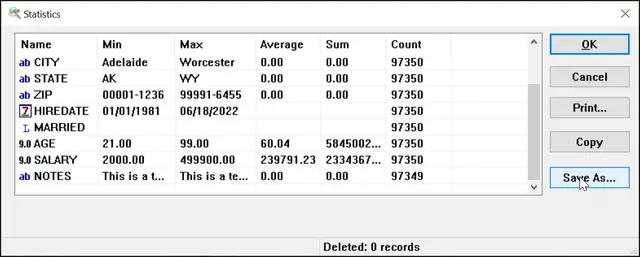
To bring up this dialog, click the View | Statistics menu or click the corresponding icon on the toolbar. DBF Viewer automatically calculates statistics and displays it in the dialog. Note that DBF Viewer automatically detects the type of the field and delivers appropriate statistical values for the given field type.
Then, you can Print the report or export it. To save the DBF statistics report as CSV, XLS or XLSX, click the Save As button and select the output format and the file name to save the report to.
DBF Statistics via Command Line
"c:\Program Files (x86)\DBF Viewer 2000\dbview.exe" file.dbf /EXPORTSTATS:file.[csv | xls | xlsx | html]
Exporting Statistics to CSV
"c:\Program Files (x86)\DBF Viewer 2000\dbview.exe" file.dbf /EXPORTSTATS:stats.csv
Exporting Statistics to XLS
"c:\Program Files (x86)\DBF Viewer 2000\dbview.exe" file.dbf /EXPORTSTATS:stats.xls
Exporting Statistics to XLSX
"c:\Program Files (x86)\DBF Viewer 2000\dbview.exe" file.dbf /EXPORTSTATS:stats.xlsx
Exporting Statistics to HTML format
"c:\Program Files (x86)\DBF Viewer 2000\dbview.exe" mytable.dbf /EXPORTSTATS:myreport.html
Exporting Statistics for multiple files
"c:\Program Files (x86)\DBF Viewer 2000\dbview.exe" d:\DBF\*.dbf /exportstats:XLSX