Filtering records in DBF File
To specify a filter for the list of records, open Tools | Set Filter menu, or click the corresponding icon on the toolbar.
Filter dialog box opens.

To disable the filter, click Tools | Remove Filter, or click the corresponding icon on the toolbar.
Set the criteria for necessary fields and click OK.
Buttons "Save" and "Load" in the filter form allows you save and load queries.
Only the records meeting your criteria will be displayed. View the number of the filtered records in status bar, Records item.
To use Quick Filter you need to move pointer on the field, right-click and select Quick Filter from context menu
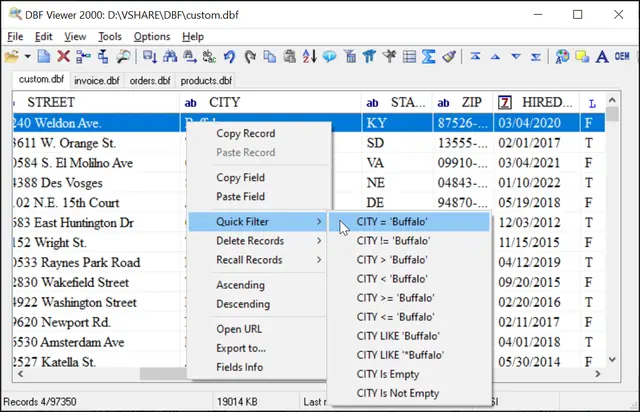
To save this records, select menu item File | Save As/Export (Export dbf files to other formats)
To delete this records, select menu item Edit | All | Delete
Filter via Command Line
Using In-line Filter command
"c:\Program Files (x86)\DBF Viewer 2000\dbview.exe" database.dbf /EXPORT:filtered.dbf /FILTER2:CHECKID:999
Set Filter from text file
"c:\Program Files (x86)\DBF Viewer 2000\dbview.exe" database.dbf /EXPORT:filtered.dbf /FILTER:filter.txt
Example for filter.txt:
Name:*Jack
ID:>100
See also: DBF to CSV, DBF to XML, DBF to SQL, command line options,