Open DBF File (2026 Update)
DBF is one of the oldest database formats. Being used since late 80s, it is still extremely common. However, not all DBF files are the same. In fact, the DBF format itself suffered a lot of changes since its first appear. And while DBF offers backward compatibility since dBase III+, you still need to make sure a database administration tool you use correctly opens each and every DBF file you may have.
DBF Viewer 2000 supports all versions of the DBF format and opens them for editing with minimum efforts. It automatically detects the version of the format, correctly deals with any number of fields and records, opens extremely large files (more than 4GB)
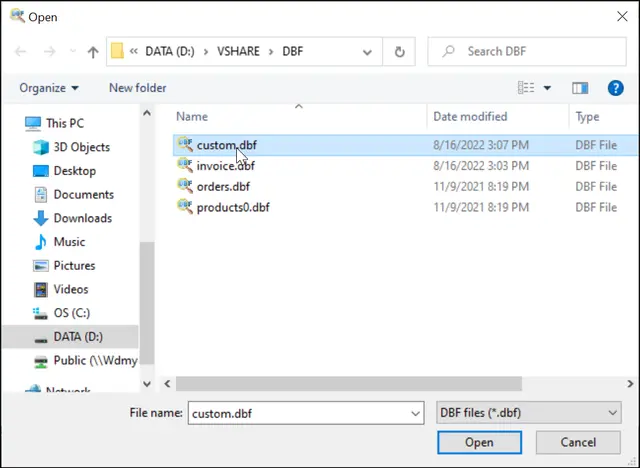
To open a DBF file, go to the File menu and click the Open command or use shortcut Ctrl-O, or click the corresponding icon on the toolbar. In the file opening dialog box select the file(s), use Ctrl and Shift keys for multiple selection.
To open with other extension (non .dbf), you need to enter file name with extension and click "OK"
Each opened file adds a new tab under the toolbar displaying the file name; click the tab to view the desired file.
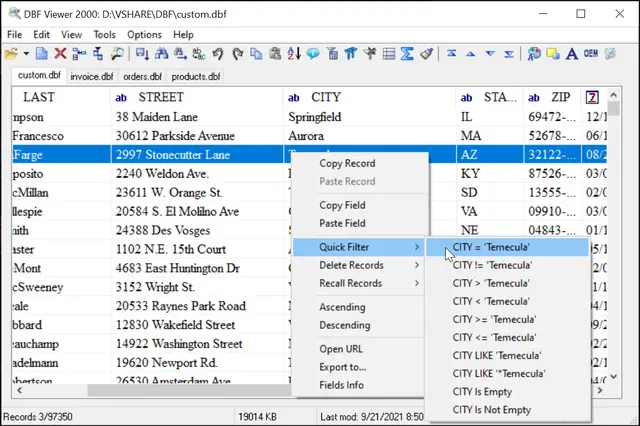
At the bottom of the window view the following information:
- The number of records in the file
- Size of the file, in KB
- Last modification date
Note, if you associated DBF Viewer 2000 with the DBF format during the setup process, you can open any DBF file by simply double-clicking it.
Download DBF Viewer 2000 right now and Open your DBF files!
Open DBF File via Command Line
"c:\Program Files\DBF Viewer 2000\dbview.exe" base.dbf [/FILTER | /SHARED | /RO | /COLUMNS | /GOLASTRECORD]
For Windows 64bit: "c:\Program Files (x86)\DBF Viewer 2000\dbview.exe" base.dbf [Options]
Open multiple files at Once
"c:\Program Files (x86)\DBF Viewer 2000\dbview.exe" c:\base\*.dbf
Open with Selected columns
"c:\Program Files (x86)\DBF Viewer 2000\dbview.exe" c:\base\mybase.dbf /COLUMNS:NAME,STREET
Open in Read-only mode
"c:\Program Files (x86)\DBF Viewer 2000\dbview.exe" c:\base\mybase.dbf /RO
Open and Go to the Last record
"c:\Program Files (x86)\DBF Viewer 2000\dbview.exe" c:\base\mybase.dbf /GOLASTRECORD
Open and Set Filter
"c:\Program Files (x86)\DBF Viewer 2000\dbview.exe" c:\base\mybase.dbf /FILTER2:Name:Smith
Frequently Asked Questions (FAQ)
How to Open DBF Files in Windows 11/10 (2026 Guide)
Many users ask how to open DBF files in modern Windows systems. DBF files cannot be opened directly in Windows or Excel. You need specialized software like DBF Viewer 2000 to view, edit, and convert DBF files.
Here's how to open DBF files in 3 simple steps:
1. Download DBF Viewer 2000
2. Open File → Open (Ctrl+O) and select your DBF file
3. View & Edit your data in spreadsheet-like interface
Why Can't I Open DBF Files?
DBF (Database File) is a legacy database format created in the 1980s. Modern Windows doesn't include native support for DBF files, and while Excel can sometimes open them, it often fails with:
- - "File format is not valid" errors
- - Corrupted data or missing fields
- - Unable to open memo fields (.FPT, .DBT)
- - Issues with large files (>2GB)
That's why you need a dedicated DBF viewer.
Can I open DBF files in Excel?
One common question about how to open DBF files relates to Excel compatibility. Excel 2003 had basic DBF support, but modern Excel (2016-2025) often fails to open DBF files correctly. Use DBF Viewer 2000 instead, then export to XLSX if needed.
Is DBF Viewer 2000 free?
Yes, we offer a 30-day free trial with full features. After that, you can purchase a license starting at $49.95.
What DBF versions are supported?
When learning how to open DBF files, it's important to know that DBF Viewer 2000 supports all versions: dBase III, dBase IV, dBase Level 7, FoxPro, Visual FoxPro, Clipper, and more.
Can I open multiple DBF files at once?
Yes! If you need to know how to open DBF files in batch, you can select multiple files using Ctrl+Shift, or use wildcards in command line: *.dbf
Do I need FoxPro or dBase installed?
No! DBF Viewer 2000 is completely independent - no database engines or drivers required.
See also: DBF to XLS (Excel), DBF to SQL, DBF to CSV, DBF Repair Tool, Filtering records, Command line options